

 Apps
 10 fixes
Quick answer: what to do now
- Wait for the estimated time shown in the app before requesting again.
- Move your pickup spot to a suggested blue dot or a main street.
- Keep location on and precise for the ride app.
- Check for an outstanding payment or unverified account details.
- Important appointment? Schedule the ride and have a backup plan.
What's your case?
Ride-hailing app can't find a driver: 10 fixes
- High demandMore requests than drivers in the area.Wait or schedule →
- Bad pickup spotA place that's hard to stop at or find.Adjust your pickup →
- Inaccurate locationThe pin lands far from you.Turn on precise location →
- Weak internetThe request doesn't reach drivers.Check your connection →
- Account issueDeclined payment or unverified details.Fix your account →
- Area not servedThe service doesn't reach your address.Backup plan →
1Wait for the estimated time and request again
According to Uber, when no drivers are available in your area, you can wait for the estimated time shown in the app. If no one accepts in that time, the app sends you a notification.
- Keep the app open while it searches.
- If you see a message that no drivers are available, wait a few minutes and request again.
- Drivers finish other trips all the time, so availability changes quickly.
2Adjust your pickup spot
Use when: you're in a gated community, mall, station or dead-end street, or the pin is far from you.
The app uses GPS to suggest a nearby pickup location. Uber shows suggested spots as blue dots on the map, chosen to make pickups easier for riders and drivers.
- Before requesting, tap another blue dot, drag the pin or search for an address.
- Tap Confirm pickup.
- Already requested? Tap Edit next to your pickup location and drag the pin within the gray circle.
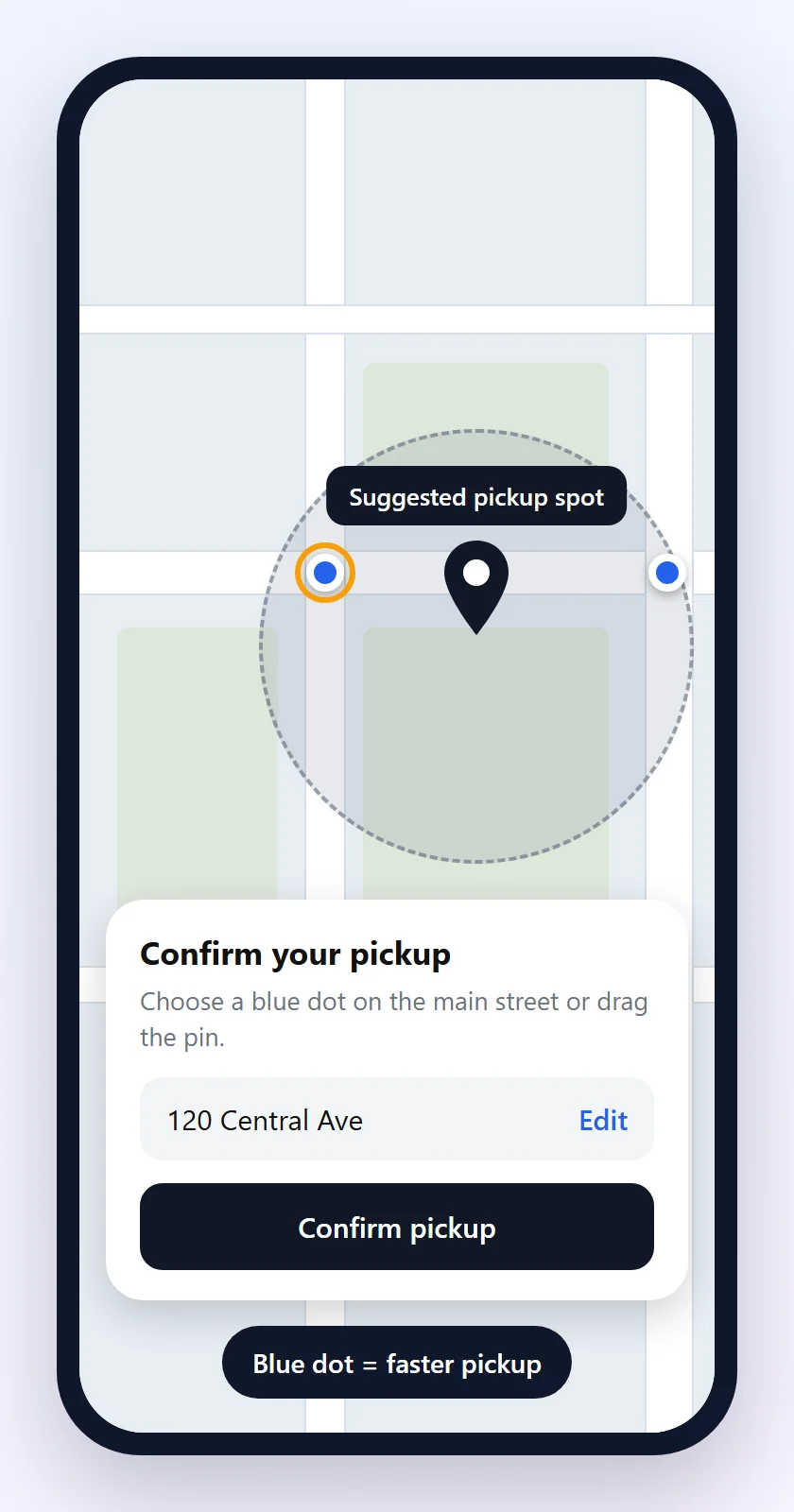
On Uber, after requesting, you can only change your pickup location once and only within the circle shown on the screen.
3Keep location on and precise
Use when: the pin shows up on another street or the app asks you to type your address.
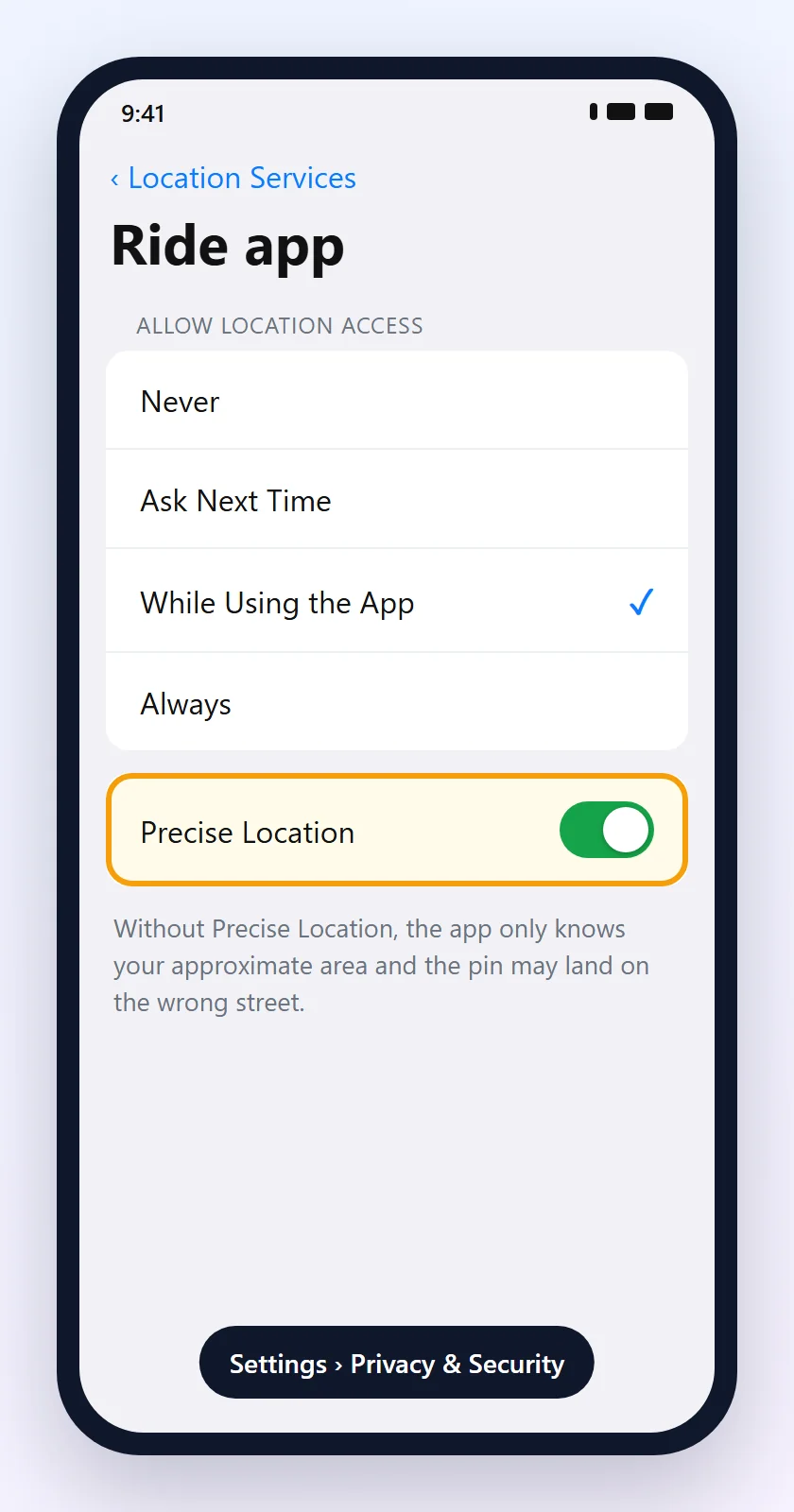
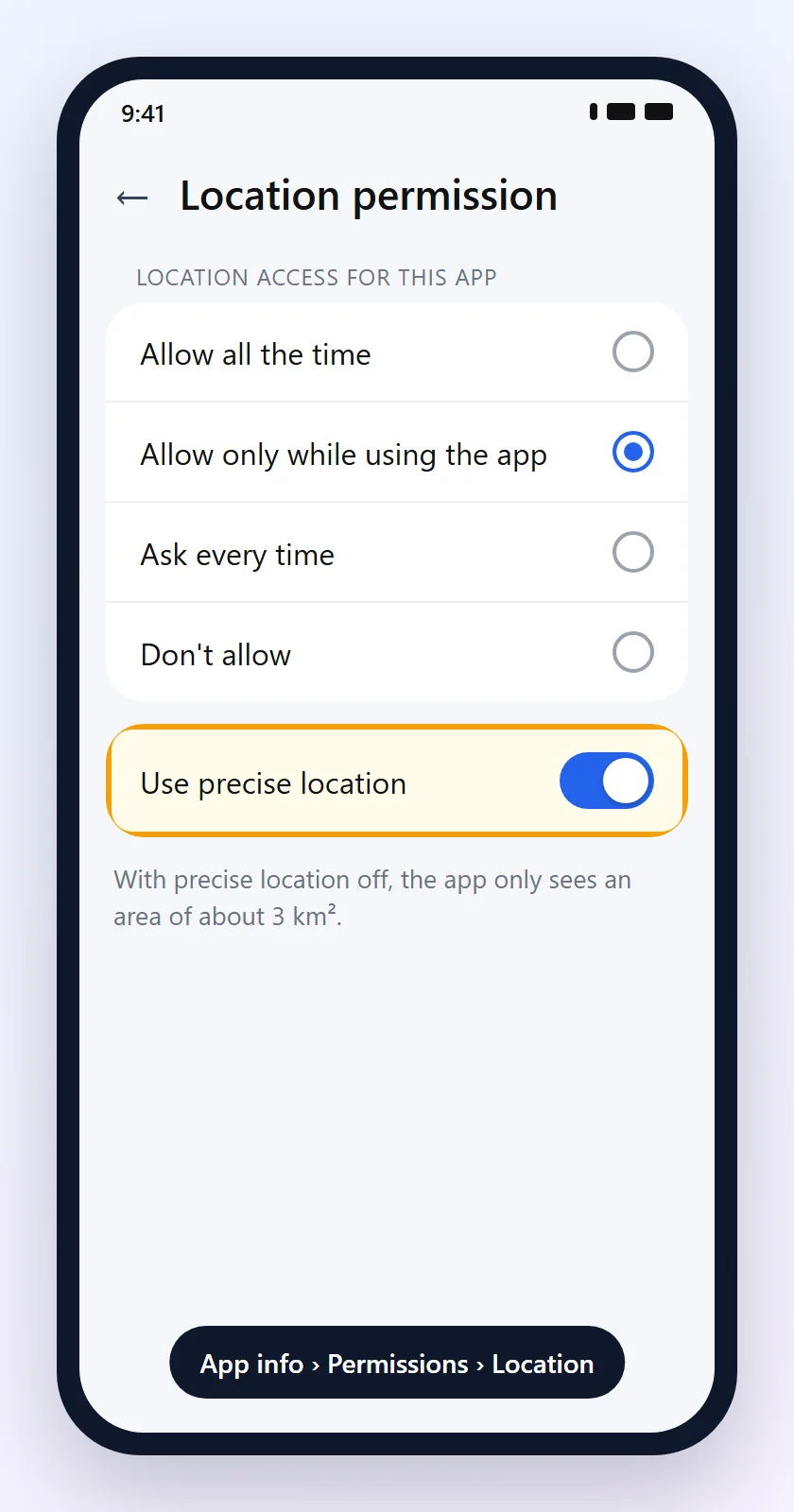
Without precise location, the app only knows your approximate area. Google explains that approximate location is accurate to about 3 square kilometers.
iPhone
Settings › Privacy & Security › Location Services iPhone
Check that Location Services is on. Tap the ride app, choose While Using the App and turn on Precise Location.
Android
Touch and hold the app icon › App info › Permissions › Location Android
Choose Allow only while using the app and turn on Use precise location. Names may vary by manufacturer.
If GPS is wrong in every app, see GPS not working on your phone.
4Check your internet
Use when: the app keeps loading, the map doesn't update or the request disappears.
- Open another app or website to see if the internet works.
- Weak Wi-Fi, like at malls and airports? Turn off Wi-Fi and use mobile data.
- Turn airplane mode on and off so your phone reconnects to the network.
No internet on mobile data? See mobile data not working.
5Understand rush hour and surge pricing
Use when: it's raining, it's rush hour, a show just ended or the price is higher than normal.
Uber explains that when many people request rides at the same time in the same area, prices can go up. This brings more drivers to the area, and the app shows a message letting you know.
- Can you wait? Give it a few minutes until more drivers show up.
- In a hurry? Accept paying a bit more to leave right away.
- Walking to a nearby street, away from an event exit, can also help.
6Try another ride option
Use when: the cheapest option has no drivers.
On the request screen, the app lists the vehicle options available for your trip. Each option has its own group of drivers, so another one may have a car closer to you.
- Compare each option's price and arrival time before confirming.
- Also try another ride-hailing app installed on your phone.
7Fix account issues
Use when: the app won't let you request a ride or shows an account warning.
Uber lists these reasons why you may not be able to request a ride:
- An outstanding payment from a previous trip. Update your payment method and clear the balance.
- The account's phone number or email hasn't been verified yet.
- Incorrect personal details, such as your date of birth.
- The service isn't available in your location.
- Problems with the device you're using.
8Update and restart the app
Use when: the app freezes, crashes or the request button doesn't respond.
- Update the ride app in the Play Store or App Store.
- Force close the app and open it again.
- Restart your phone.
See the walkthrough in how to update apps safely and app keeps crashing.
9Schedule the ride in advance
Use when: you have a flight, appointment, exam or interview.
On Uber, you can schedule a ride from 30 minutes to 30 days in advance. The app sends the request for you before the time you choose.
- Enter your destination in Where to? and choose a ride option.
- Tap the clock icon next to the Confirm button.
- Set the date and time and tap Reserve.
Uber itself notes that scheduling doesn't guarantee a driver. You can schedule rides to the airport, but not from it. For important times, leave early and have a backup plan.
10Have a safe backup plan
- Use another ride-hailing app, a taxi, the subway or the bus.
- Before getting in, check that the license plate, car model and driver photo match what the app shows, as Uber advises.
- Never get into a car that wasn't confirmed in the app, even if the driver offers you a ride on the street.
- Wait in a well-lit, busy place.
Situation and what to do
| Situation | Likely cause | What to do |
|---|---|---|
| Endless “Finding your driver” | Few free drivers | Wait for the estimated time (step 1) |
| Pin far from you | Inaccurate location | Adjust pickup and location (steps 2 and 3) |
| Map won't load | Weak internet | Check the connection (step 4) |
| Rain and high prices | High demand | Wait or accept the price (step 5) |
| Cheapest option has no cars | Few drivers for that option | Try another option (step 6) |
| Can't request | Account issue | Pay and verify details (step 7) |
| Set appointment time | Risk of delay | Schedule and have a backup (steps 9 and 10) |
Frequently asked questions
Why can't the ride-hailing app find a driver?
The most common reasons are high demand in the area, a hard pickup spot, inaccurate location, weak internet or an account issue.
How long should I wait?
Wait for the estimated time shown in the app. On Uber, if no one accepts in that time, you get a notification and can request again.
Does changing the pickup spot help?
It helps when you're somewhere hard to stop. Use the blue dots suggested by the app or a nearby main street.
Why do prices go up when there are no drivers?
When many people request rides in the same area, prices can rise to bring in more drivers. You can wait a few minutes or pay more to leave right away.
Why won't the app let me request a ride?
There may be an outstanding payment, an unverified phone number or email, incorrect personal details, or the service may not cover your location.
Do I need to keep location on all the time?
No. “While using the app” is enough. What matters is keeping precise location on so the pin lands in the right place.
Does scheduling a ride guarantee a driver?
No. Uber notes that scheduling doesn't guarantee a driver. If no one accepts, the app sends you a notification.
Can I schedule a ride from the airport?
On Uber, no. You can schedule rides to the airport. When leaving it, request a ride on the spot.
Is it safe to take a car that offers a ride on the street?
No. Only get into the car confirmed by the app and check the license plate, model and driver photo before getting in.
What if I have an appointment and no car shows up?
Try another ride option or app, call a taxi or use public transportation. For future appointments, schedule in advance and leave early.
Related content
More practical solutions in Apps.

App Keeps Crashing: How to Fix It
Learn how to fix apps that keep crashing on Android or iPhone by checking updates, storage, permissions, and possible system issues.
 15 minutes
Instagram Won't Load: How to Fix App Problems
Learn the identify problems of connection, cache, update and instabilidades when the Instagram won't load the feed, stories, reels or mensagens.
10 minutes
How to Update Apps Safely
Learn how to update apps on Android, iPhone, and computers using official sources to protect your data and keep your devices secure and stable.
Sources
- Uber Help: I can't request a ride
- Uber Help: why are prices higher than normal?
- Uber Help: changing your pickup location
- Uber Help: what are suggested pickup locations?
- Uber Help: how to schedule a ride
- Uber Help: how to identify a driver and their vehicle
- Apple Support: turn Location Services and GPS on or off on your iPhone
- Google Account Help: manage location permissions for apps
The screens in this guide are illustrations made by Fixfy and don't reproduce any specific app. Menu names vary by ride-hailing app, manufacturer and system version.